Do you have an estimate of how many surveys you’ve received in the past week? The past month? The past year? When you open your inbox, isn’t it flooded with requests to share your “valuable opinion/thoughts”? For example, whenever you make a purchase, you probably received an email with a survey that asked something like:
How did you like ___(what you bought)___?
How would you rate your shopping experience on a scale of ___ to ___?
Please tell us what you thought of __(seller’s brand)___
If you are running a business, you can see that these types of questions are too generic. Your customers expect to receive them. But customers have no incentive to respond to them because they’re the usual questions they’ve seen a hundred times: not personalized or relatable, and consequently, they don’t respond.
You’re wasting time, effort, and money on what could – and should – have been an insightful engagement.
In this blog, you’ll learn how to avoid this and get on the right track to delight your survey takers while getting the right feedback from them. Analyze this feedback to get actionable insights about customers!
What is Survey Fatigue?
You know that feeling you get when you’ve had too much of something like candy, or ice cream, or hot dogs?
How do you deal with it when you are offered more of that same thing?
What can you do to get a break from it?
Consider the same situation, but about the surveys you send.
That is what survey fatigue feels like.
Survey fatigue is a sign that people are bored, uninterested, or outright annoyed by feedback surveys.
It is a relatively new phenomenon, mainly because of the innumerable surveys people come across every day. Think about it – languishing in their email inboxes, sent to them as text messages, popping up on websites they visit, intruding on them as they scroll through social media — surveys are everywhere!
Yet, response rates are plummeting. With lesser customer feedback, companies have to take risks about whether the product or service they are offering for sale will resonate with their target market.
So what is the solution to survey fatigue? Do you stop sending surveys altogether?

Don’t get us wrong – surveys are great, but with a qualifier: they’re only great when they delight people.
To that end, let’s figure out how to delight the people whose feedback you seek.
We will begin by uncovering the causes of survey fatigue, then discussing its types and how to overcome this challenge with actionable and insightful feedback to avoid its negative impact.
What Causes Survey Fatigue?
One of the most common causes of survey response fatigue is repetitive questions. A Stanford University study on survey fatigue concluded that “The number of times a respondent has taken [a] survey has an adverse effect on the quality of answers they provide.”
The same study also highlighted the length of the survey as a contributing factor for questionnaire fatigue because “the extent of respondents’ survey fatigue at late stages in the survey, resulting in underreporting of activities, is significant both statistically and substantively.”
Simply put, seeing similar surveys peeves people. Plus, they don’t like to answer too many questions.
How Do You Know Survey Fatigue Is Already Happening?
Most teams wait until response rates drop sharply before they act. By then, the data they have already collected may be compromised. Here are the signals worth tracking in your survey dashboard before things get critical:
- Declining Response Rates Over Time: If the same survey, sent to a comparable audience, is getting fewer completions each month, that’s the clearest sign.
- Rising Abandonment Midway: Respondents who start but don’t finish are telling you the survey is too long or too repetitive. Track drop-off by question, not just overall.
- Shorter Open-Ended Responses: When the average word count in text fields drops from 20 to 5, engagement quality declines even if completion rates remain stable.
- Straight-Lining on Rating Scales: This occurs when respondents give the same score to every item in a matrix without careful reading. It’s a sign of disengagement, not genuine neutrality.
- Lower Response Quality on Repeat Sends: Compare the first deployment of a survey to its third or fourth. If the insights are thinning, your audience is checked out.
Catching these signals early lets you adjust cadence, question count, or targeting before fatigue compounds.
So let’s dig into the various types of participant fatigue that can result from these (and more) factors.
What Are the Different Types of Survey Fatigue?
Fatigue shows up in two meaningfully different ways, and they need different solutions.
Response frequency fatigue happens when someone receives too many surveys across too many channels over too short a period. They may not even open the next one. The fix here is about cadence, suppression rules, and cross-channel deduplication, not about the survey itself.
Response burden fatigue happens inside the survey. The respondent started it, but the length, complexity, or relevance of the questions wore them down before completion. The fix here is about question design, skip logic, and survey structure.
Treating both the same way leads to the wrong interventions. Cutting a 25-question survey to 10 does not fix the problem when the respondent has already received five surveys that month. And setting a 30-day cooldown period doesn’t help when the one survey you send has a rating matrix with 15 rows.
Know which type of fatigue you’re dealing with before you start making changes.
So how do you jump these hurdles that stand in the path of your business’s growth? Here’s a step-by-step framework to redefine the way you may have been conducting surveys till now!
How To Overcome Survey Fatigue: Step-by-Step
For starters, speed through this brief checklist with your existing survey before you get on with the larger task:
Upgrading it to be a perfect survey that asks the right question at the right time to the right person.
- Respond to your survey like your target audience would
- Eliminate each & every unnecessary question ruthlessly
- Mark all junctions where conditional logic can be applied
- Consider adding an open-ended feedback question at the end
Optimized your currently running survey? Time to upgrade it into a great survey that doesn’t cause fatigue.
Let’s have a look at the right steps.
Step 1: Make Your Questionnaire
- Make an exhaustive list of empathetic questions: Get them all in there because that was the easy part.
- Keep questions clear and concise: If it takes people too much time to think or reason, it will strain them. For this reason:
- Use open-ended questions deliberately, not as defaults. A single open-ended question placed at the end of a survey, kept optional, is one of the best ways to capture the ‘why’ behind a rating. What to avoid is leading with open-ended questions, putting multiple text fields mid-survey, or making them required. That’s what creates the burden, not the format itself.
- Use yes/no and multiple-choice questions
- Don’t use a rating matrix: A list of items that need scoring on a scale of 1 to 10 sounds boring to any survey taker. Tracking it is hard as well.
- Use branching and skip logic: Use this to present the most relevant questions to people. Let them skip whatever’s not applicable to them.
- Delete complicated, indirect, or offensive questions. Bring in unbiased people to expand your viewpoint and judge the survey.
- Cross out every question whose answer does not enrich your knowledge in exactly the way you need to improve your business.
Read More – Survey vs Questionnaire: Compare the Differences
Step 2: Set the Right Length and Time for Your Survey
Is your survey short and sweet? Fill in the responses, time it, then invite your peers and time them, too.
If you feel it is not stretching out the intended respondents’ minds unnecessarily, you’ve struck gold.
Tip: Consider adding a visual progress bar at the top to encourage respondents to finish the survey.
The length of the survey and the time taken to complete it are quite important factors that directly affect the quality of the customer feedback – making them both short. Distill the questionnaire until you have only the most concise, relevant, and empathetic questions. Keep the survey length as short as possible. Make sure respondents don’t feel like they are investing too much time, or your abandonment rate will rise.
Focus on gathering insights, not just answers.
So what is the recommended length for a survey?
Five minutes is a reliable target for most use cases. Research shows that you absolutely need to keep it under 20 minutes, before abandonment increases sharply. But the more important variable is relevance. A six-minute survey on something the respondent just experienced will outperform a two-minute generic survey every time.
Ten questions are a reasonable starting point. The real test is whether each question drives a decision. If you can’t name what you’d do differently based on the answer, cut the question.
Bonus tips on how to write the best survey questions
- Use simpler language and avoid jargon.
- Use shorter questions instead of compound ones.
- Don’t use questions that are too personal or threatening (if you still feel the need, then place them at the end, so that survey taker are not shocked right off the bat).
- Use a customer feedback tool that offers readymade survey templates designed for specific use cases.
Step 3: Fine-Tune Your Survey
- Make sure you are maintaining a consistent scale (e.g., Likert, numerical/alphabetic grades, stars, etc.)
- Apply conditional logic, skip logic, question branching to reduce the chances of survey fatigue further.
- Carefully consider the pros and cons of having an open text field generic feedback question at the end.
- Test different frequencies of sending your surveys to identify the frequency that nets the most feedback.
- Use advanced targeting techniques to make sure that your surveys are reaching only the most relevant targets.
The last two points are crucial. Here’s why:
Repeatedly insisting upon customers to provide feedback hurts you twofold:
- Customer attrition: They may leave you for your competition
- Irrelevant feedback: The quality of their feedback drops
That is why you must continuously test and identify the most promising frequency of sending out surveys.
What Does Frequency Capping Actually Look Like in Practice?
Telling teams to “test different frequencies” is useful in principle, but without guardrails, it leads to over-surveying by default. Here’s a more concrete framework:
- Set a minimum cooldown period. Most teams benefit from a 30-day suppression window per respondent per survey type. Respondents who completed a survey should not receive another from the same product or team for at least 30 days. Those who have abandoned should be suppressed for even longer.
- Deduplicate across channels. If a respondent already received an NPS survey via email this month, they should not also receive an in-app NPS Nudge™ in the same period. Track survey exposure across delivery channels in one place.
- Create a suppression list for recent interactions. Anyone who just contacted support, submitted a complaint, or completed onboarding in the last 7 to 14 days may not be in the right frame of mind. Exclude them from general survey sends until the window has passed.
- Never resurvey for the same question within a quarter. Asking the same NPS or CSAT question more than once per quarter to the same audience produces diminishing returns and erodes goodwill.
Sending the same survey to your entire user base is one of the fastest ways to erode response rates. Broad sends mean most recipients will find the survey irrelevant, and irrelevance is one of the most reliable predictors of fatigue and abandonment.
Instead, target based on dimensions that actually reflect where someone is in their relationship with your product:
Role or Job Title: A product manager and a billing admin have different experiences. Their survey questions should reflect that.
Journey Stage: A user in their first week has different feedback to offer than someone who has been active for six months or who recently churned.
Product Behavior: Target users who actually used the feature you’re asking about. If they haven’t touched it, the question is irrelevant to them.
Account Type or Plan Tier: Free users and enterprise customers have different contexts and different stakes. Mixing them in one send produces noise.
Recent Interaction: Someone who just spoke to support or attended a webinar is in a different mindset than a user who logged in for the first time this week.
Qualaroo’s advanced targeting lets you build these segments using URL behavior, visit history, custom variables, and the Identify API to tie responses to real users by email or customer ID, so you’re always asking the right person, not just the available one.
These rules don’t require a complex tech stack. Most survey platforms, including Qualaroo’s advanced targeting, let you set display frequency, suppress by cookie or user ID, and exclude specific segments by recent behavior.
Here’s a great example targeting a user who has visited your pricing page twice and has not made a purchase yet.
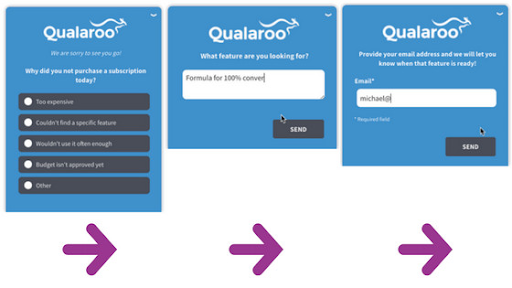
You have the power and knowledge to generate unique engagements tailored to who your users are or what they’re doing.
Bonus Tips to Make The Survey Experience Better
- Mention how much time it will take people to complete the survey.
- Give a solid and transparent reason why the survey taker should participate. This can include the outcome or result in you expect from it. Ensure that the outcome you specify matches the questions you ask.
- If your survey results helped you make a decision (an outcome that you specified in the beginning), then communicate it to the survey takers to make them feel a part of the change.
Need more information?
Check out our extensive and insightful Marketer’s Guide To Surveying Users
Step 4: Test Your Survey(s) & Launch!
Are you in the enviable position of having more than one version of your survey? Time for A/B testing.
Even with one great survey, you may find aspects that could be improved once it is out there. Fix them.
Remember – A survey may lose its novelty and efficiency over time. Be prepared to keep updating!
Bonus Step: Create a Continuous Feedback Loop
One of the most underrated ways to reduce survey fatigue is also the most obvious: show respondents that their feedback changed something.
When people answer a survey and never hear what happened next, they reasonably conclude that it wasn’t worth their time. The next survey you send them is fighting that assumption. Close the loop by communicating what you heard and what changed, even briefly, and you shift the dynamic entirely.
This doesn’t require a formal announcement. A product changelog note, an in-app message that says “Based on your feedback, we updated X,” or a short follow-up email referencing what you learned are all enough to rebuild the sense of purpose that drives participation.
The business benefits follow naturally:
- Decreased customer churn rate
- Increased customer lifetime value
- Positive word-of-mouth from customers who feel heard
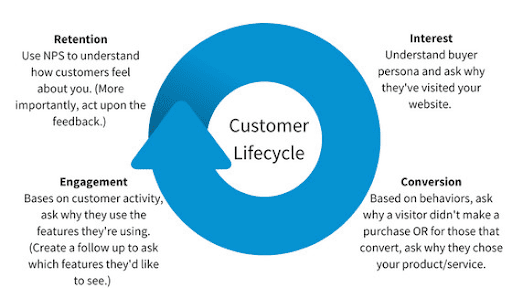
The feedback loop is especially important if your position vis-à-vis the competition depends on staying up to date with customer preferences. Here’s how you can ask the right questions to the right customers unobtrusively and delightfully, as well as a comprehensive bank of questions you can ask customers.
Bonus Related Read: How To Improve Survey Response Rate
People are faced with hundreds, if not thousands, of decisions every day. Try not to waste their valuable time (and, by extension, your own precious time) by asking them irrelevant or extra survey questions.
FREE. All Features. FOREVER!
Try our Forever FREE account with all premium features!
How Survey Fatigue Impacts Your Business Negatively
Ask yourself – why are you doing a survey?
To get answers?
To gather data?
To explore what else you might be doing to make your customers more happy and satisfied than they have ever been before?
Whatever your reason for carrying out surveys, if the responses aren’t useful to your purpose, it’s a failure. And one of the biggest challenges in gathering relevant customer feedback is survey fatigue.
Survey fatigue can impact your business quite severely – and these are not positive impacts.
Some of the possible negative impacts that may stem from survey fatigue (and its underlying causes):
- Bring down your response rate
- Reduce the value of responses
- Drop in customer retention rate
- Give you useless customer data
- Increase customer attrition rate
- Make your brand look unprofessional
The tricky part is that several of these signals look like normal variation until you pull them together. A slight dip in response rate, a modest increase in midsurvey abandonment, a few shorter open-ended answers, none of these individually set off alarms.
But when they move in the same direction over two or three consecutive survey sends, that’s the pattern worth addressing.
And these are just the direct, obvious factors. In the larger picture, survey fatigue causes intangible losses that can eventually come back to impact businesses’ bottom lines negatively if left unchecked.
Qualaroo uncovers the ‘why’ – not just about survey fatigue, but behind customers’ actions
Qualaroo lets you engage your customers on a more intimate level to get truly actionable insights! Asking contextual and relevant questions throughout the customer journey as opposed to just the beginning or end lets you access a wealth of knowledge about your customer’s decision-making process.
You will learn why customers are making certain decisions and, hence, predict their desires better. Your surveys should ask relatable questions that get you true collect customer feedback to understand them better, not run-of-the-mill template-based generic ones that may cause survey fatigue and impact growth.
Watch: How To Collect Customer Feedback
Ask contextual questions at the moment with Qualaroo NudgesTM to eliminate survey fatigue. Most importantly, if your survey completion rates are dropping alarmingly, take immediate action now!
FREE. All Features. FOREVER!
Try our Forever FREE account with all premium features!

 We'd love your feedback!
What did you like & how can we make it even better?
 Thanks for your feedback!
 Ask Your Question
Have a question? Get expert help to make your decision easier.